

For a small business, that map gives your Digital Growth System something practical to work around. Your website, local listings, replies, booking process, and follow-up each have a job. The map helps you decide what that job should be.
Start with the work someone needs done
Pick a service you want to understand better. A homeowner planning a bathroom remodel gives you more to work with than a general category such as “people who need contractors.”
That homeowner may need to compare materials, understand the estimate, arrange access, and agree on a schedule. An urgent plumbing repair involves different decisions. Keep those requests on separate maps if you handle them differently.
Write the customer's goal at the top of your map. Then ask what they need to know before taking the next step. If someone needs to speak with their spouse before approving an estimate, include that decision. It helps explain what happens between sending a quote and receiving an answer.
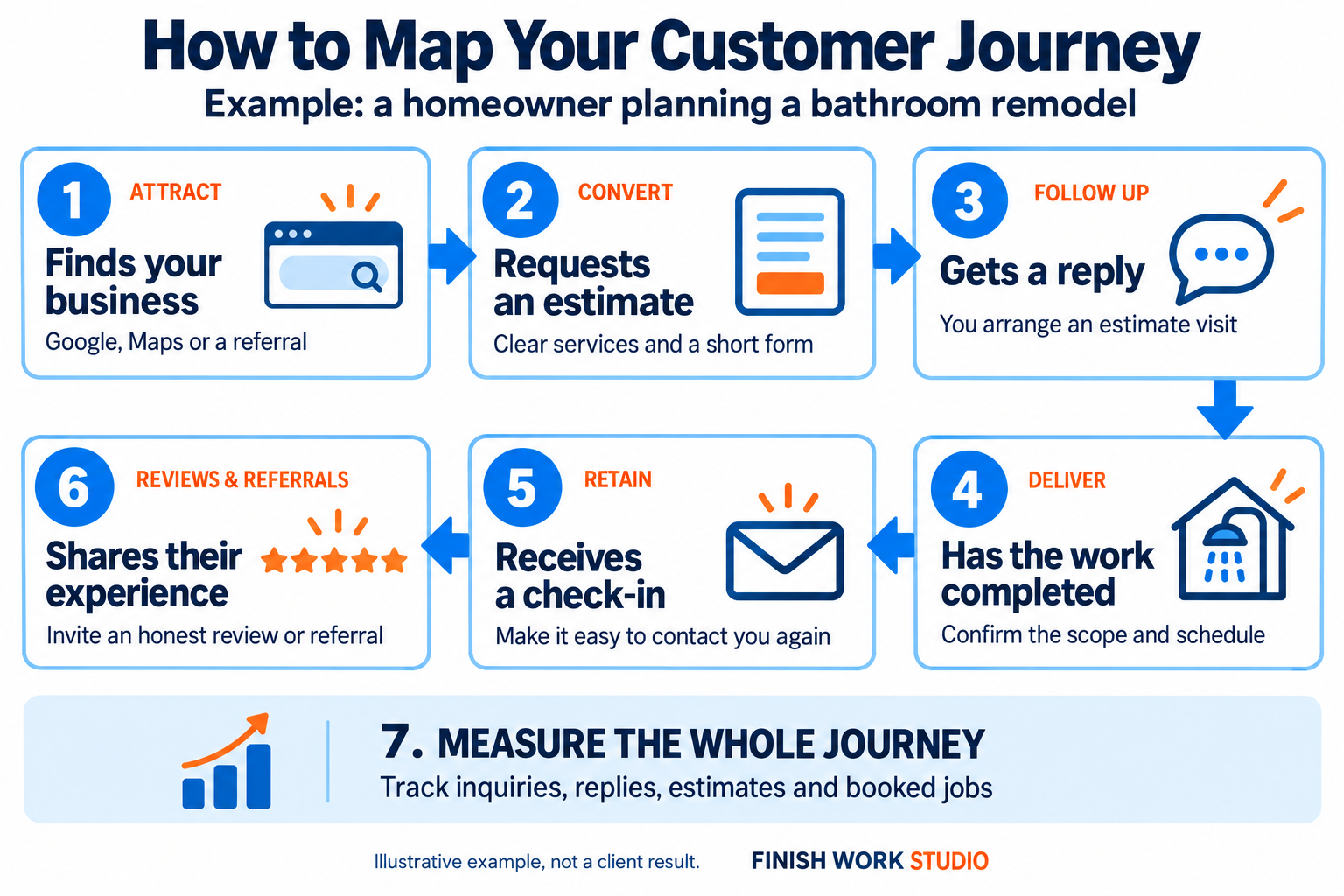
Fill in what actually happens
Look through recent inquiries, estimates, appointments, and completed jobs. Ask the person who handles calls what customers repeatedly want to know. Then check those answers with customers themselves.
Ask what they needed to know before getting in touch and whether anything was difficult to find or arrange. Keep their answers in their own words. A comment about unclear material options gives you something specific to address on the service page.
If your business is new, write down the process you plan to offer and label your map “Planned process.” Ask a potential customer to walk through it with you. Leave unknowns visible and revise the map as real inquiries arrive.
Write the question, action, owner, and proof
For each of the first six stages in the example, write down four things: what the customer needs to know or do, your next action, the person responsible and their backup, and what confirms the next step happened.
Here is an illustrative example for a contractor handling a planned project. It shows the details you can add beside each step; it is not a customer case study.
| Customer needs | Our next action | Person responsible | What confirms it happened |
|---|---|---|---|
| Know whether the work is offered in their area | Keep service details clear and confirm fit when they inquire | Owner or person handling inquiries | The service and location are confirmed in the request record |
| Understand what the estimate includes | Explain the scope and agree on the next step | Estimator | The estimate and next action are documented |
| Prepare for the work | Confirm the agreed schedule, access, and preparation | Project lead | The customer receives the details and any questions are resolved |
Use the role names your team recognizes. If you do everything yourself, put your name beside each responsibility and decide what happens when you are unavailable.
Check the customer's side and your own records. You may have sent an estimate successfully while the customer is still waiting for an explanation. Add that conversation to the map.
Include the different routes into your business
A homeowner might hear your name from a neighbor, look at your project photos, check your Google Business Profile, and then call. Another person may contact you directly because you handled a previous job. These are possible routes to confirm with your customers, not assumptions to record as facts.
For your local SEO, AEO, and GEO work, note whether customers mention search results, Google Maps, or AI answers. Check what information they needed after finding you and whether your service page provided it.
Keep the first place they heard about you separate from where they contacted you. If you cannot confirm either answer, leave it unknown. The map should help you learn which information and channels customers use.
Make room for waiting and exceptions
Leave room between receiving a request and booking a job. An estimate may need measurements, the customer may be comparing options, or your team may need to check availability. Record what each person is waiting for.
Add notes next to your map for exceptions, such as a missed call, a request outside your service area, or an estimate awaiting a decision. Write what should happen next and who handles it.
For example, a missed call could create a task for the person processing inquiries, with a backup if they are away. Any acknowledgment should set an expectation your team can meet. It shouldn't offer an appointment that hasn't been confirmed yet.
Connect the tools to the work
Once the map reflects how customers and your team actually work, decide which tools would help.
If people repeatedly ask whether you offer a particular service, your website may need a clearer explanation. If requests come in while you are on a job, you need a reliable way to record them and assign a reply. If an estimate needs another conversation, give that next action an owner and a date.
Business automation can support agreed tasks, such as responding to a request or reminding someone about a scheduled appointment. Decide what the message should say and when a person needs to step in before setting it up.
The map gives you a process to build. Our business lead checklist can then help you test the handoffs.
Choose one improvement to check
Measure, the seventh stage shown at the bottom of the image, applies across the whole journey. Pick one handoff and record a starting result. For example, count suitable estimate requests and how many have a documented next step. Keep both totals and the time period.
Choose a change, assign the person making it, and set a review date. Use the same definition when you count again. If another change happened at the same time, such as a new ad campaign or reduced availability, note that too.
As inquiries come in, update the map when someone takes a route you missed. Bring your notes to a free Growth Audit if you want help deciding which part of the process needs attention first. Finish Work Studio works with small businesses in Cocoa, FL, and across Brevard County to connect these customer-facing tasks into a Digital Growth System.